
See which cell depend on current cell


You want to see which cells rely on the value in the current cell. 

Choose any cell and click Trace Dependents to see which cells directly refer to the active cell.

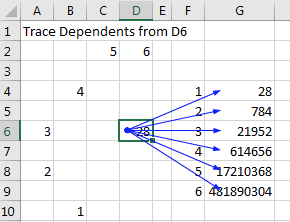
The 28 in D6 is referenced by six other formulas in G4:G9. Select D6 and Trace Dependents. Blue arrows point to each of the dependent cells in G4:G9.

Comments

Popular posts from this blog

40 Power Query Editor features in Power BI

40 Power Query Editor features in Power BI along with examples: 1. Filter Rows: Remove rows based on conditions. Example: Remove rows with a null value in the "CustomerName" column. 2. Remove Duplicates: Eliminate duplicate rows. Example: Remove duplicate entries based on the "OrderID" column. 3. Sort Rows: Arrange rows in ascending or descending order. Example: Sort data by "Date" column in descending order. 4. Replace Values: Substitute one value with another. Example: Replace "N/A" with "Unknown" in the "Status" column. 5. Split Columns: Divide a column into multiple columns. Example: Split "FullName" into "FirstName" and "LastName." 6. Merge Queries: Combine data from multiple sources. Example: Merge customer and order data based on the "CustomerID." 7. Group By: Aggregate data based on a specific column. Example: Group sales data by "ProductCategory" and calculate the sum ...

20 Time Intelligence Dax Measures

20 Time Intelligence DAX measures in Power BI with examples: Year-to-Date Sales: css Copy code YTD Sales = TOTALYTD( [Total Sales] , Calendar [Date] ) Month-to-Date Sales: css Copy code MTD Sales = TOTALMTD( [Total Sales] , Calendar [Date] ) Quarter-to-Date Sales: css Copy code QTD Sales = TOTALQTD( [Total Sales] , Calendar [Date] ) Previous Year Sales: mathematica Copy code Previous Year Sales = CALCULATE ( [ Total Sales ] , SAMEPERIODLASTYEAR ( Calendar [ Date ] ) ) Year-over-Year Growth: css Copy code YoY Growth = DIVIDE( [Total Sales] - [Previous Year Sales] , [Previous Year Sales] ) Rolling 3-Month Average Sales: sql Copy code 3 M Rolling Avg Sales = AVERAGEX(DATESINPERIOD(Calendar[ Date ], MAX (Calendar[ Date ]), -3 , MONTH ), [Total Sales]) Cumulative Sales: scss Copy code Cumulative Sales = SUMX (FILTER(ALL(Calendar), Calendar [Date] <= MAX (Calendar[Date])), [Total Sales] ) Running Total Sales: scss Copy code Running Total Sales = SUMX (FILTER(ALL(Calendar), Calen...
Power BI MCP Server

AI-driven interaction with semantic models is starting to reshape the Power BI conversation. With Microsoft introducing MCP server capabilities (Preview), AI agents can interact directly with models — reducing the gap between a business question and a data response. From the perspective of delivering Power BI solutions across multiple enterprise clients, the potential is clear — but so are the responsibilities. Where this can help • Lower barrier for business users to explore data • Faster insight cycles through conversational access • Streamlined development and analytical workflows Where caution is required 🔐 Security, governance, and guardrails When AI agents interact with live semantic models, the exposure surface expands. This isn’t just about authentication — it’s about: • Enforcing robust role-based access and data segmentation • Monitoring query behavior and usage patterns • Preventing unintended access paths to sensitive datasets • Establishing guardrails around agent c...